


Teach your people to actually work with AI.
Most organisations have rolled out company-wide AI assistant tools such as Copilot and watched almost nothing change. This is the training that fixes that: realistic workplace scenarios, hands-on prompt practice, and an AI coach that tells people exactly what to do better.
Fourteen levels · 32 mix & match modules · Microsoft 365 Copilot, ChatGPT and Gemini · Team analytics included
Earn an AI Capability Credential: Foundation, Practitioner, Advanced
Mapped to the Skills England AI foundation skills for work benchmark
Live exercise · Grounding
“86 unread emails about Project Phoenix. Your management meeting starts in 15 minutes.”
See what you're getting
No mock-ups. These are the actual screens your learners and managers use once they sign in.
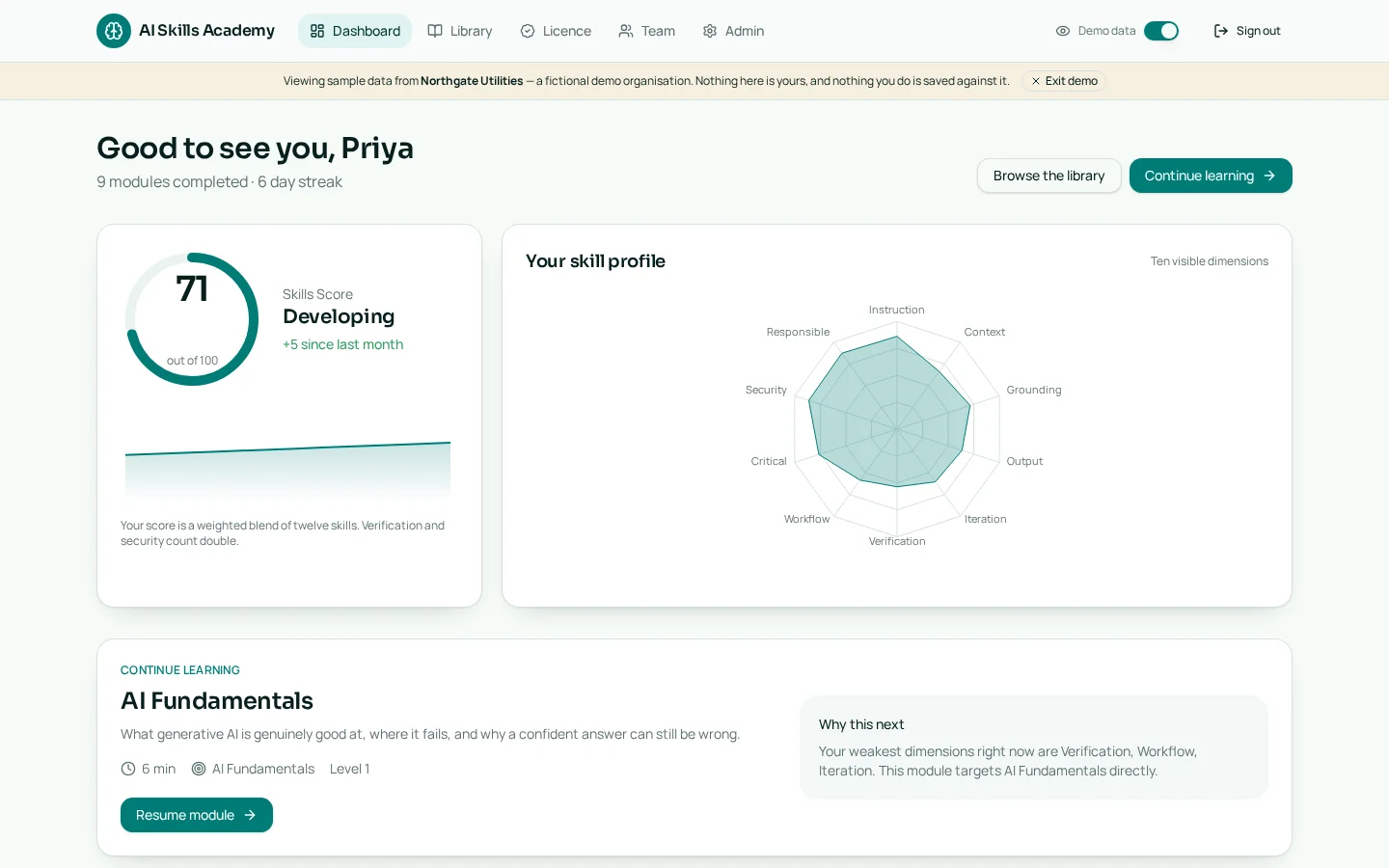
Personal dashboard
Each learner sees their live Skills Score — a blend of twelve skills — with a ten-skill radar profile, progress trend and the next module recommended for their weakest skills.
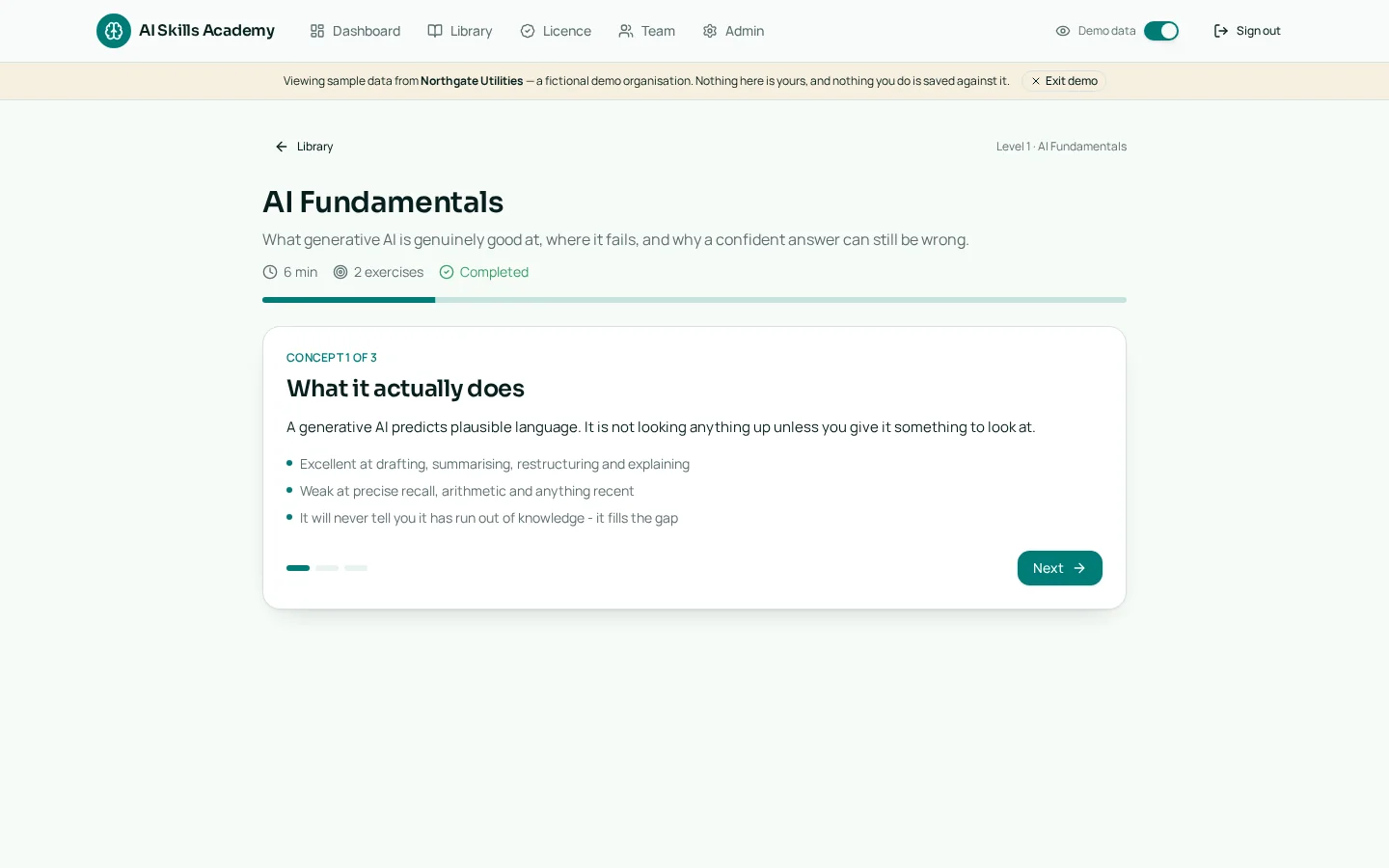
Short concepts, then real practice
Modules mix concise concept cards with hands-on exercises such as improving a weak prompt, spotting AI mistakes and sequencing a workflow.
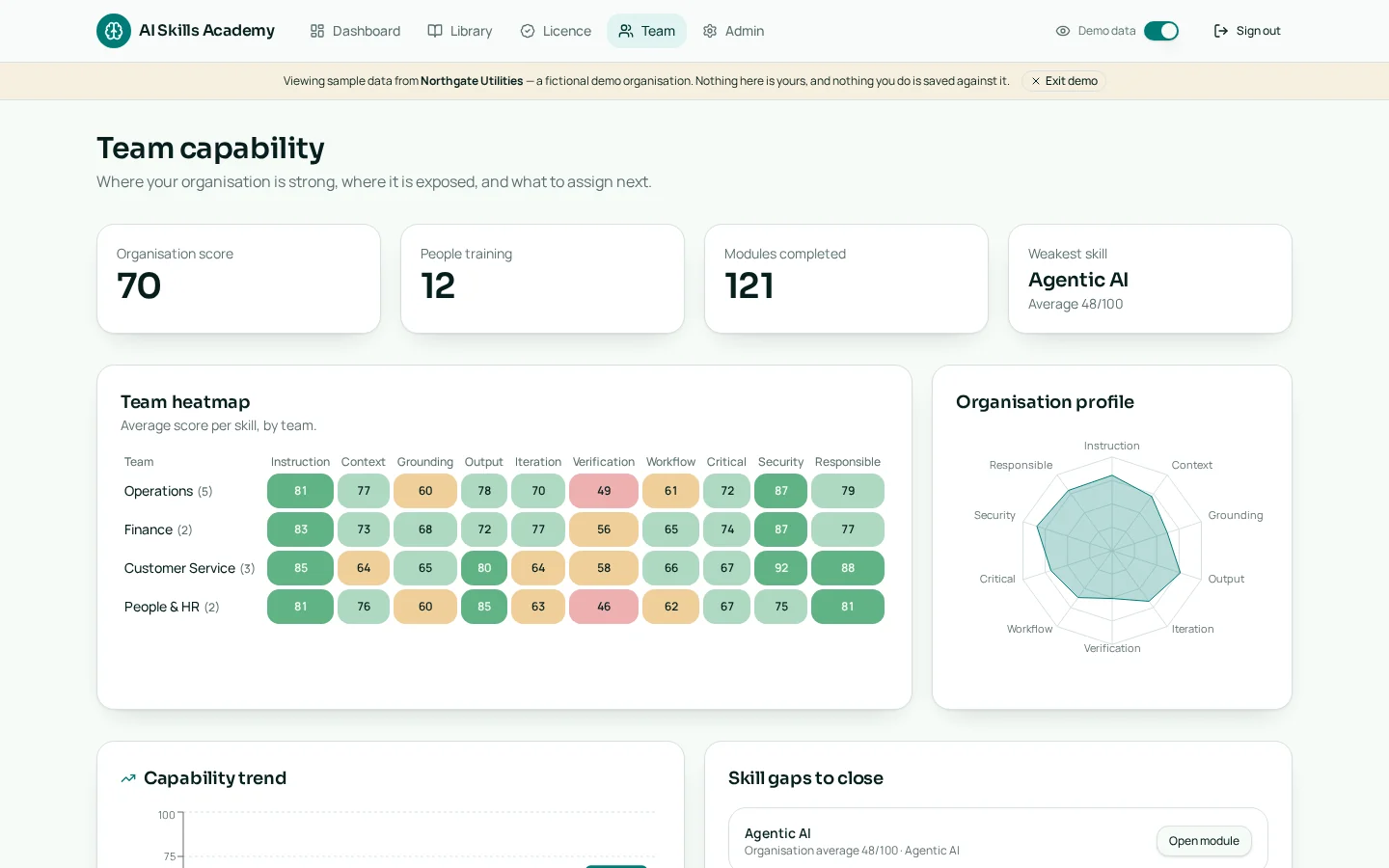
Team capability heatmap
Managers see average scores per skill by team, organisation-wide gaps and a capability trend so they know where to focus next.
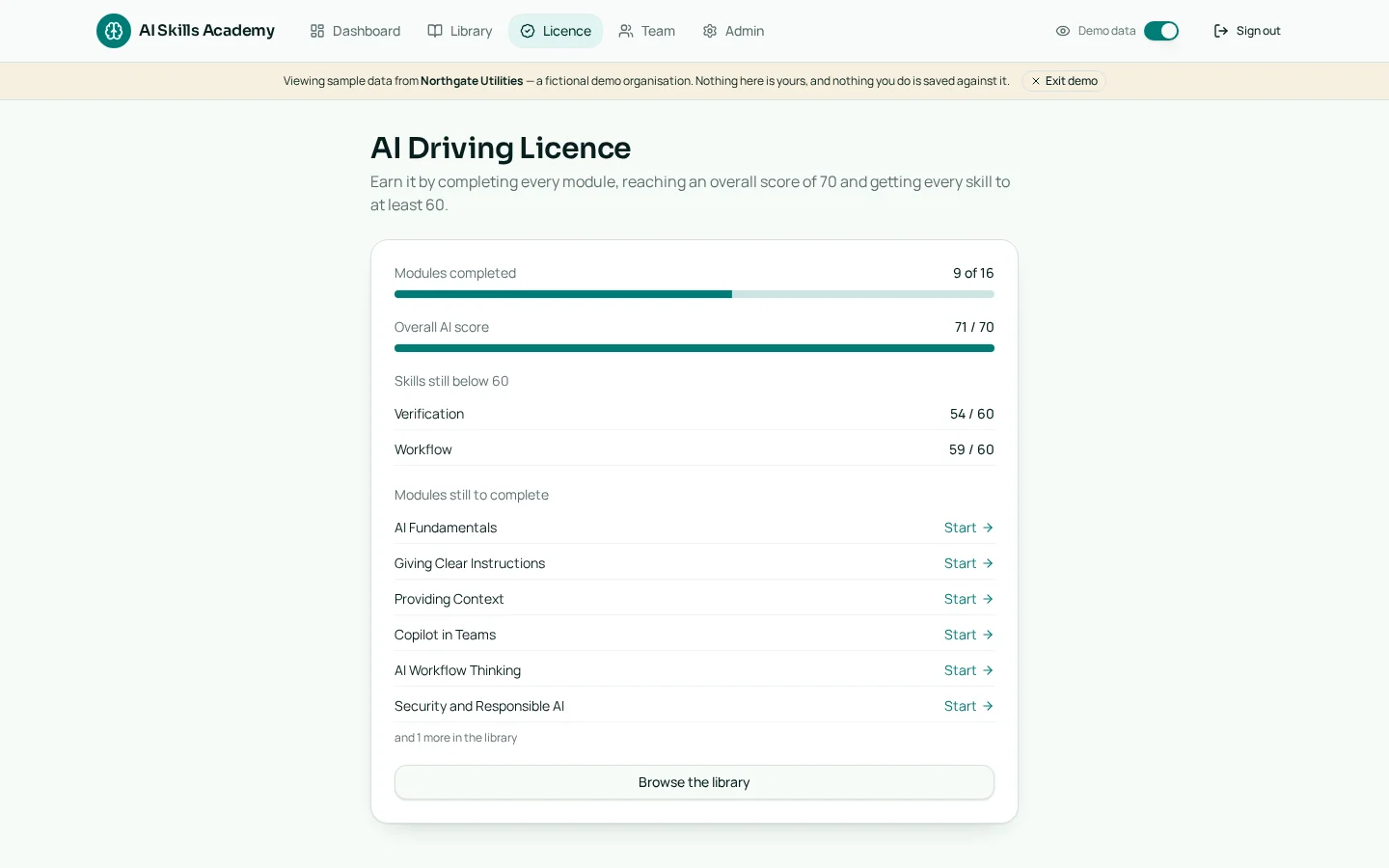
AI Capability Credential
Completion of all 32 modules, plus an overall score of 70 and every skill above 60, earns a verifiable certificate with public verification link.
Built like a driving lesson, not a manual
Learners get short concept cards, then immediately do the thing. Feedback is specific, the score moves, and the next recommendation targets their weakest skill.
Practise, don't watch
Short intro videos set the scene, but every module ends in a real task: rewrite the weak prompt, spot the invented figure, sequence the workflow. No passive quiz theatre.
An AI coach that marks your work Flagship
Open-text answers are evaluated on goal, context, sources, output and verification — with specific coaching, then a retry.
Capability you can measure
A twelve-skill Skills Score per person, rolled up to team heatmaps and organisation-wide gaps for your leadership team.
Whichever assistant you've rolled out
Dedicated tracks for Microsoft 365 Copilot, ChatGPT and Google Gemini, with your approved and prohibited tools built into the exercises.
A day in the job, not a lesson
In “Covering for your director” the learner walks into a full workspace: an inbox, a chat with the AI assistant, briefing documents and a deadline. They have to brief a board paper, chase the right facts and get an answer out.
- The assistant is deliberately unreliable — some figures it offers are invented.
- Grading combines hard checks with AI coaching: what did they verify, and what did they miss?
- The result feeds the same Skills Score as every other module.
Inside the simulation
Help while you practise
Nobody gets left staring at a blank box. Support sits inside the exercise, at the moment it's needed.
A tutor on every module page
Stuck on a concept, or unsure what the coach meant? A floating AI tutor answers questions about the module and the feedback — without handing over the answer.
Worked example prompts
On written exercises, learners can reveal a model answer alongside a checklist of the points it covers, so good looks concrete rather than abstract.
Coaching, then a retry
Feedback names exactly what was missing and lets people rewrite the same prompt immediately — the retry is where the skill actually sticks.
For managers and admins
Roll it out, direct it at the gaps that matter, and keep control of who's in and which tools they're told to use.
Assignments with due dates
Assign modules to a whole team or named individuals. Learners see what's due on their dashboard; managers see who has finished.
Team heatmaps and gaps
Average score per skill by team, organisation-wide weak spots, a capability trend, and a card showing how a manager compares to their own team.
Grounded in your own AI policy Flagship
Admins upload your AI policy, InfoSec rules, approved tools and procedures — and the exercises, scenarios, coaching feedback and generated modules all draw on them. Core AI skills and your organisation's AI practice stay clearly labelled.
Streaks that build the habit
Consecutive-day activity tracking keeps AI practice as a routine rather than a one-off training day.
Offline roleplays for team sessions
Every core skill ships with a two-person roleplay — one person prompts, one plays the AI assistant. Run them in kick-offs, team meetings or training days; they're bonus exercises and never count towards scores.
Build new modules with AI Flagship
Admins describe a topic in a sentence and the module creator drafts the concept cards, scored exercises and worked examples — so the curriculum keeps up as new AI tools arrive.
Admin console
Content and scoring weights, teams and roles, approved and prohibited AI tools, plus access control by email domain, invite link or deactivation.
Build your business case in a minute
Answer six quick questions about your organisation and we'll write the case for you — the problem, a transparent value calculation, the risk and governance angle, how you'd measure it and a 90-day rollout. Copy it straight into an email or a budget paper.
Earn an AI Capability Credential
Learners earn a verifiable AI Capability Credential at Foundation, Practitioner or Advanced level — not a generic certificate, but proof that they can use AI safely, effectively and productively at work.
- Complete all 32 modules across the fourteen levels
- Reach an overall AI score of 70 or above
- Clear 60 or above in every one of the ten profile skills shown on your radar
Verifiable certificate Flagship
A personal certificate page showing the holder's name, organisation, credential level, number, issue date and all ten skill scores.
Print or PDF
A print-optimised A4 layout, so learners can download or print a clean copy.
Public link
A shareable `/verify/AIDL-...` link that anyone can check without signing in.
Fourteen levels, from first prompt to agentic guardrails
Learners can follow the path or jump to the module their score says they need. Managers can make any module mandatory for a team or role.
- 1AI fundamentals and hallucination
- 2Clear instructions
- 3Providing context
- 4Grounding and sources
- 5Controlling the output
- 6Iterative prompting
- 7Verification
- 8Microsoft 365 Copilot in Outlook, Teams, Word, Excel and PowerPoint
- 9Workflow thinking
- 10AI as a critical thinking partner
- 11Security and responsible AI
- 12Agentic AI and guardrails
- 13Leader Track: leading an AI-assisted team
- 14Technical Track: automation, data and agent building
Build measurable AI capability — plans from £99/month
Assess skills, identify gaps, deliver targeted training and track improvement. Plans scale from a first team to organisation-wide rollout.
See where your organisation actually stands
Run the free team assessment for up to 10 people and get a live capability report — overall score, skill gaps and an executive summary — in about 15 minutes. Or create an account and explore the full academy.